Appendix for service personnel
TACOCONTROL Z1 S
NOTICE!
Certain cables in the controller box are live
with 230 V voltage.
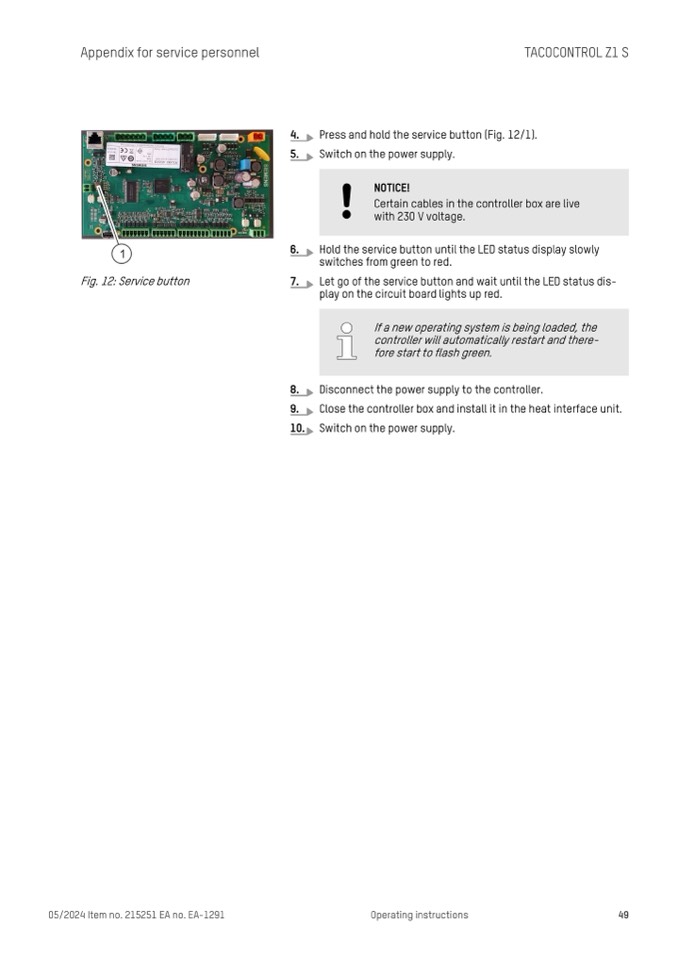
Fig. 12: Service button
4.
Press and hold the service button (Fig. 12/1).
5.
Switch on the power supply.
6.
Hold the service button until the LED status display slowly
switches from green to red.
7.
Let go of the service button and wait until the LED status dis-
play on the circuit board lights up red.
8.
Disconnect the power supply to the controller.
9.
Close the controller box and install it in the heat interface unit.
10. Switch on the power supply.
If a new operating system is being loaded, the
controller will automatically restart and there-
fore start to flash green.
05/2024 Item no. 215251 EA no. EA-1291
Operating instructions
49

