Operation
ES 5941Z
4.3
Selecting the operating mode
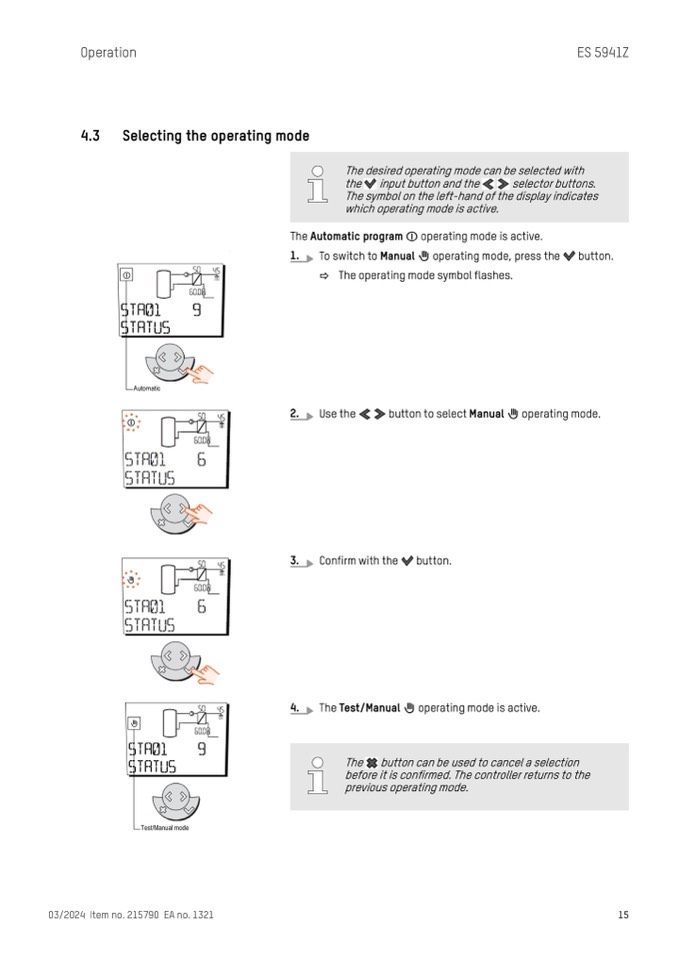
The Automatic program
1.
To switch to Manual
operating mode is active.
operating mode, press the button.
The desired operating mode can be selected with
the input button and the selector buttons.
The symbol on the left-hand of the display indicates
which operating mode is active.
ð The operating mode symbol flashes.
2.
Use the button to select Manual
operating mode.
3.
Confirm with the button.
4.
The Test/Manual operating mode is active.
03/2024 Item no. 215790 EA no. 1321
15
The button can be used to cancel a selection
before it is confirmed. The controller returns to the
previous operating mode.

