ES 5941Z
Operation
4.4.1 Adjusting the standard display
Accepting a value in the standard dis-
play
4.4.2 Resetting energy data
Resetting energy in kWh
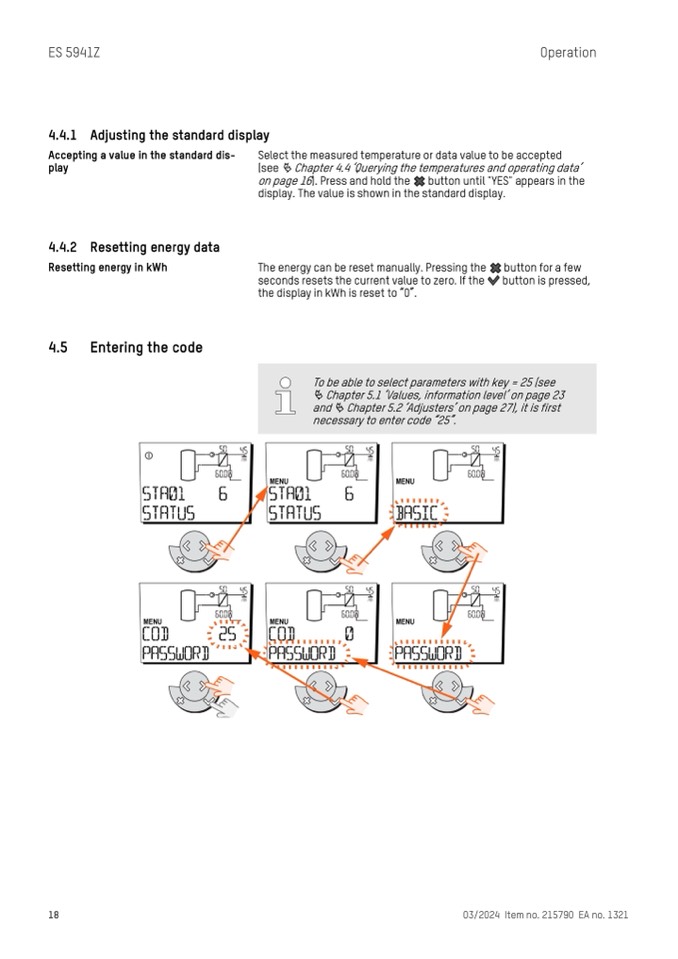
4.5
Entering the code
Select the measured temperature or data value to be accepted
(see Ä Chapter 4.4 ‘Querying the temperatures and operating data’
on page 16). Press and hold the button until "YES" appears in the
display. The value is shown in the standard display.
The energy can be reset manually. Pressing the button for a few
seconds resets the current value to zero. If the button is pressed,
the display in kWh is reset to “0”.
18
03/2024 Item no. 215790 EA no. 1321
To be able to select parameters with key = 25 (see
Ä Chapter 5.1 ‘Values, information level’ on page 23
and
Ä Chapter 5.2 ‘Adjusters’ on page 27), it is first
necessary to enter code “25”.

