Operation
ES 5941Z
4.6
Time of day, date and time programs
4.6.1 Time of day and date
The time of day and the date are set via the param-
eters BAS09 and BAS10. See
Ä Chapter 4.7 ‘Set-
tings’ on page 20 and
Ä Chapter 5.2 ‘Adjusters’
on page 27 in this regard. The changeover from
daylight saving time to standard time and vice versa
is done automatically.
4.6.2 Time programs
There are 3 individual time programs for circulation,
thermal disinfection and for recharging available in
the controller.
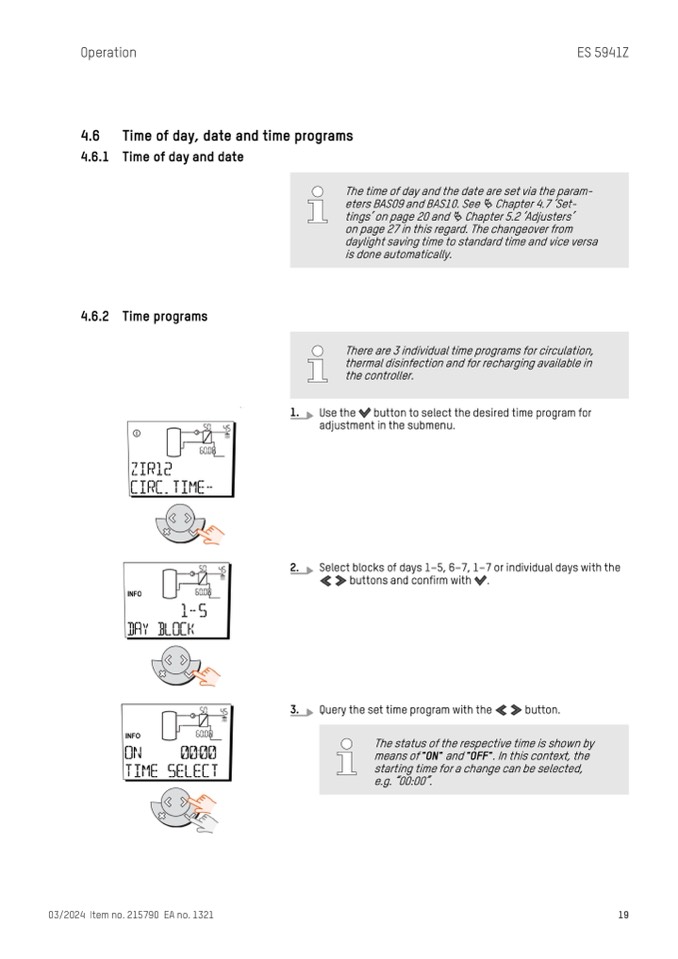
1.
Use the button to select the desired time program for
adjustment in the submenu.
2.
Select blocks of days 1–5, 6–7, 1–7 or individual days with the
buttons and confirm with .
3.
Query the set time program with the button.
03/2024 Item no. 215790 EA no. 1321
19
The status of the respective time is shown by
means of "ON" and "OFF". In this context, the
starting time for a change can be selected,
e.g. “00:00”.

