ES 5941Z
Operation
4.
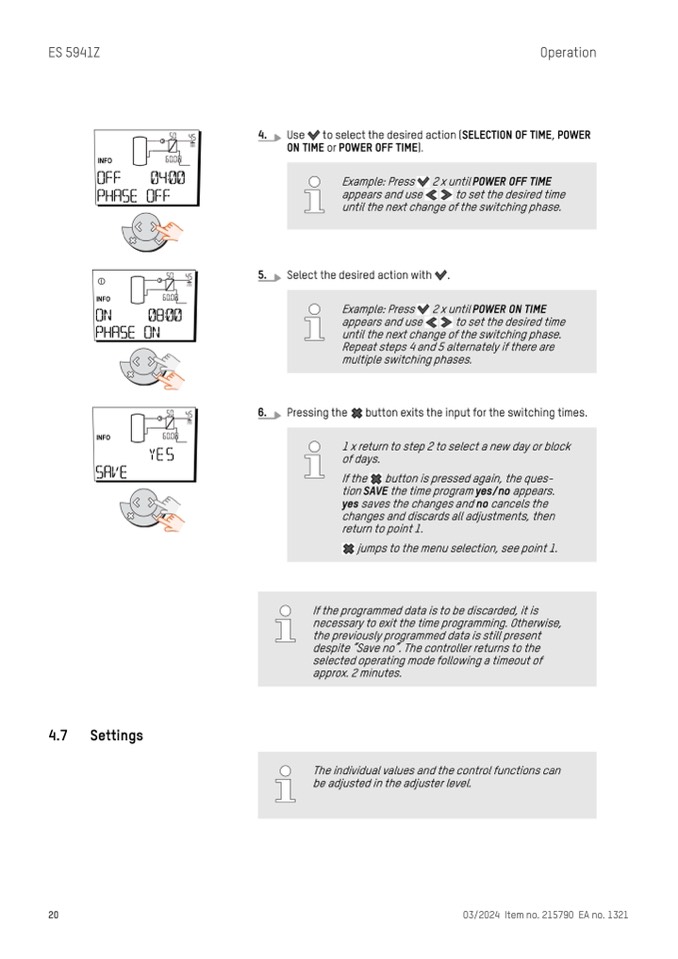
Use to select the desired action (SELECTION OF TIME, POWER
ON TIME or POWER OFF TIME).
5.
6.
Select the desired action with .
Pressing the button exits the input for the switching times.
1 x return to step 2 to select a new day or block
of days.
If the
button is pressed again, the ques-
tion SAVE the time program yes/no appears.
yes saves the changes and no cancels the
changes and discards all adjustments, then
return to point 1.
jumps to the menu selection, see point 1.
If the programmed data is to be discarded, it is
necessary to exit the time programming. Otherwise,
the previously programmed data is still present
despite “Save no”. The controller returns to the
selected operating mode following a timeout of
approx. 2 minutes.
4.7
Settings
20
03/2024 Item no. 215790 EA no. 1321
Example: Press 2 x until POWER OFF TIME
appears and use to set the desired time
until the next change of the switching phase.
Example: Press 2 x until POWER ON TIME
appears and use to set the desired time
until the next change of the switching phase.
Repeat steps 4 and 5 alternately if there are
multiple switching phases.
The individual values and the control functions can
be adjusted in the adjuster level.

