Operation
ES 5941Z
1.
2.
3.
4.
5.
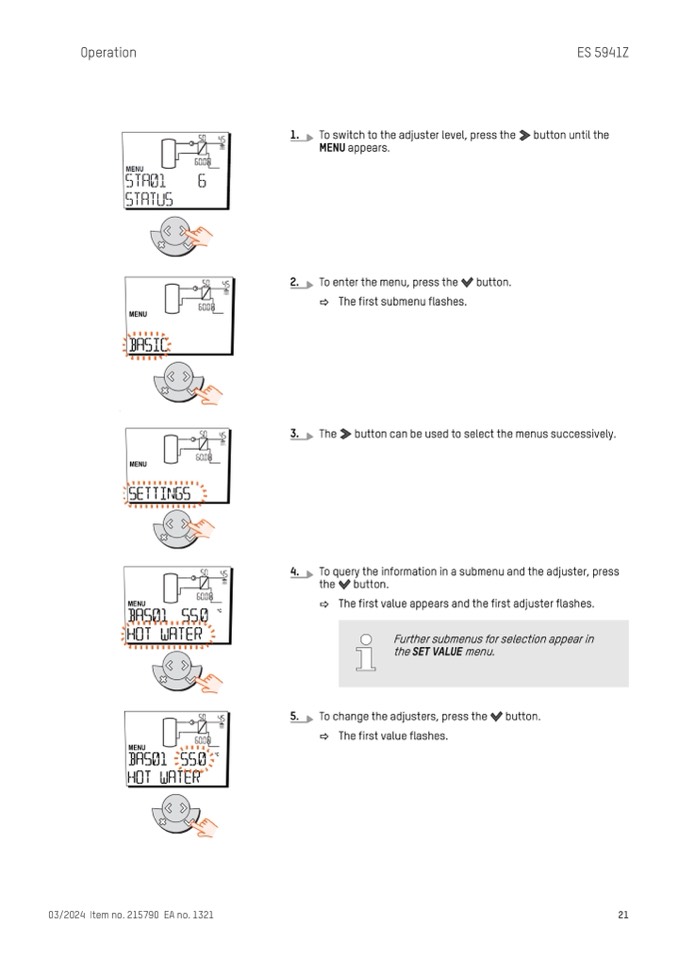
To switch to the adjuster level, press the button until the
MENU appears.
To enter the menu, press the button.
ð The first submenu flashes.
The button can be used to select the menus successively.
To query the information in a submenu and the adjuster, press
the button.
ð The first value appears and the first adjuster flashes.
To change the adjusters, press the button.
ð The first value flashes.
03/2024 Item no. 215790 EA no. 1321
21
Further submenus for selection appear in
the SET VALUE menu.

