TACOCONTROL Z1 S
Overview
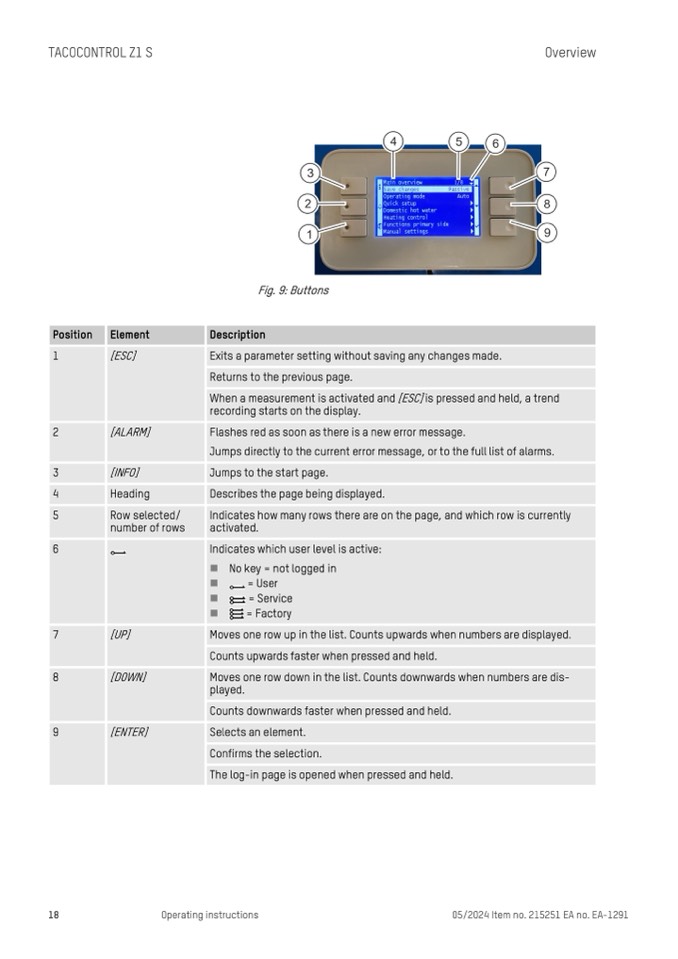
Fig. 9: Buttons
Position
Element
Description
1
[ESC]
Exits a parameter setting without saving any changes made.
Returns to the previous page.
When a measurement is activated and [ESC] is pressed and held, a trend
recording starts on the display.
2
[ALARM]
Flashes red as soon as there is a new error message.
Jumps directly to the current error message, or to the full list of alarms.
3
[INFO]
Jumps to the start page.
4
Heading
Describes the page being displayed.
5
Row selected/
number of rows
Indicates how many rows there are on the page, and which row is currently
activated.
6
Indicates which user level is active:
n No key = not logged in
n
n
n
= User
= Service
= Factory
7
[UP]
Moves one row up in the list. Counts upwards when numbers are displayed.
Counts upwards faster when pressed and held.
8
[DOWN]
Moves one row down in the list. Counts downwards when numbers are dis-
played.
Counts downwards faster when pressed and held.
9
[ENTER]
Selects an element.
Confirms the selection.
The log-in page is opened when pressed and held.
18
Operating instructions
05/2024 Item no. 215251 EA no. EA-1291

