Faults
TACOCONTROL Z1 S
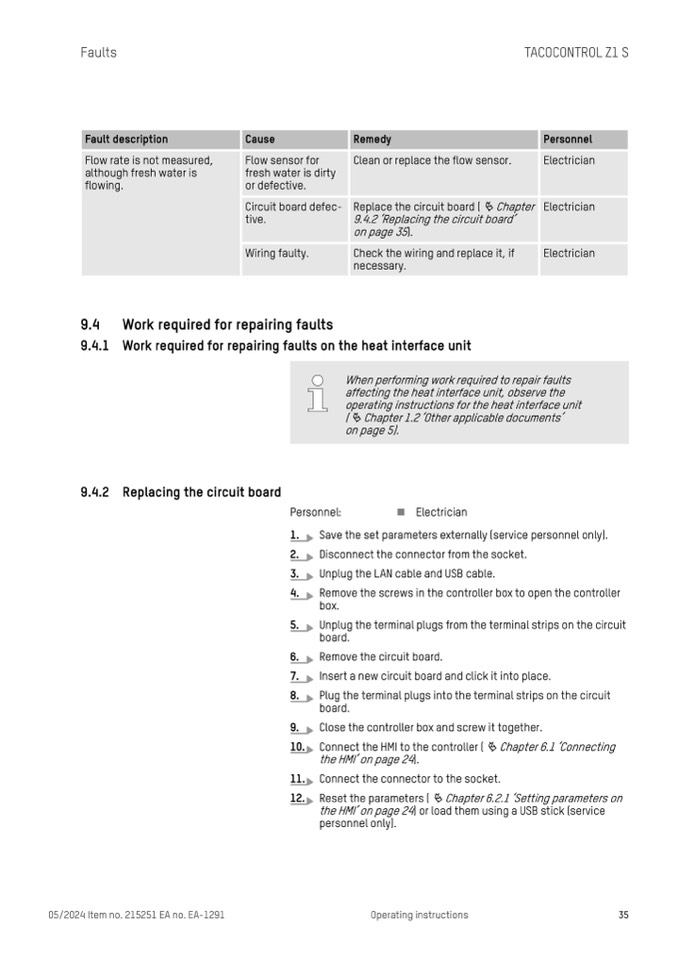
Fault description
Cause
Remedy
Personnel
Flow rate is not measured,
although fresh water is
flowing.
Flow sensor for
fresh water is dirty
or defective.
Clean or replace the flow sensor.
Electrician
Circuit board defec-
tive.
Replace the circuit board (
Ä Chapter
9.4.2 ‘Replacing the circuit board’
on page 35).
Electrician
Wiring faulty.
Check the wiring and replace it, if
necessary.
Electrician
9.4 Work required for repairing faults
9.4.1 Work required for repairing faults on the heat interface unit
When performing work required to repair faults
affecting the heat interface unit, observe the
operating instructions for the heat interface unit
(
Ä Chapter 1.2 ‘Other applicable documents’
on page 5).
9.4.2 Replacing the circuit board
Personnel:
n Electrician
1.
Save the set parameters externally (service personnel only).
2.
Disconnect the connector from the socket.
3.
Unplug the LAN cable and USB cable.
4.
Remove the screws in the controller box to open the controller
box.
5.
Unplug the terminal plugs from the terminal strips on the circuit
board.
6.
Remove the circuit board.
7.
Insert a new circuit board and click it into place.
8.
Plug the terminal plugs into the terminal strips on the circuit
board.
9.
Close the controller box and screw it together.
10. Connect the HMI to the controller ( Ä Chapter 6.1 ‘Connecting
the HMI’ on page 24).
11. Connect the connector to the socket.
12. Reset the parameters (
Ä Chapter 6.2.1 ‘Setting parameters on
the HMI’ on page 24) or load them using a USB stick (service
personnel only).
05/2024 Item no. 215251 EA no. EA-1291
Operating instructions
35

